Is Your Security Team Scalable? Why LLMs are the Only Answer
The Caffeine Pill for Security Teams
Security teams have too much work and not enough time. There is a huge gap between the amount of new code being written and the number of people available to check it. I want to share how LLMs can help. We can use AI to act on your team's behalf, helping you work faster and focus on real threats.
Understanding the AI Engine
Before building AI tools, it is important to understand the technical rules that govern how these models process data. Knowing that models are stateless helps you design better systems that rely on context rather than memory.
Tokens and Context: AI reads words in small pieces called “tokens,” which represent about 3/4 of a word.
Stateless Nature: Most modern AI models are stateless, meaning they do not “learn” or change their internal weights while you are talking to them.
Memory: Because the AI is stateless, it doesn’t remember your last question; to give it “memory,” you must include the previous parts of the conversation in your new request.
Data Quality: It is better to give the AI high-quality information (context) in your prompt—sometimes up to 128k tokens—than to try and “train” or fine-tune the model itself.
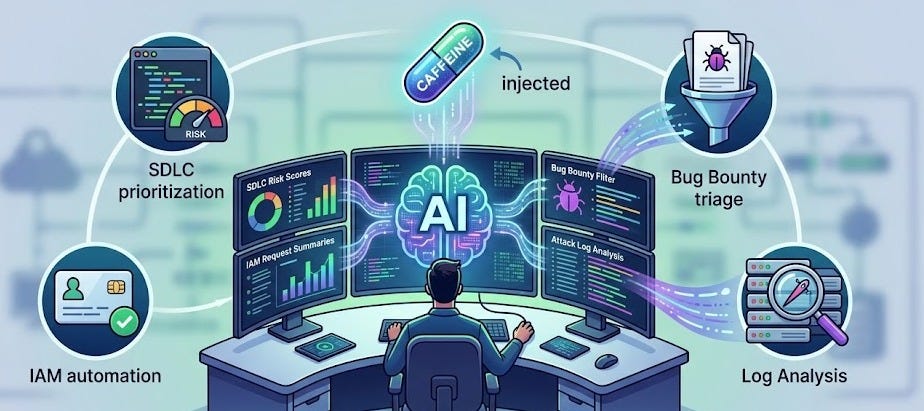
Checking Projects Faster (SDLC)
The Software Development Life Cycle (SDLC) is the process of building software, and in a fast company, it can be very unpredictable. Using AI to automate the initial review of these projects allows security teams to prioritize the most dangerous changes.
Risk Scoring: You can use an AI bot to read design documents and give a “risk score” and “confidence level” to show which projects need a human expert first.
Watching Changes: If a developer changes a plan—for example, making a private tool public—the AI can see this change and raise the risk score immediately.
Passive Monitoring: AI can watch chat channels; if it sees a developer talking about a security mistake (like skipping a password check), it can alert the security team.
Managing Access (IAM)
Giving people the right permissions to use tools is often slow and creates friction for engineers. AI can simplify this by matching a user’s natural language request to the technical groups required to do their job.
Simple Language: Instead of searching for a specific technical group name, a user can describe what they need, and the AI finds the right access group for them.
Smart Approvals: AI can look at how a person usually works using “cosine similarity”; if their request looks normal for their role, it can be approved faster.
Audit Trails: All access granted through these AI tools is logged to create a clear history for security audits.
Sorting Bug Reports
If you have a “bug bounty” program, you might get thousands of reports every day, which is too much for humans to handle. AI can act as a first filter to remove noise and send real vulnerabilities to the right people.
Filtering the Noise: AI can quickly read reports and close the ones that are just complaints or “out of scope,” like missing email headers.
Directing Traffic: The AI can send payment issues to the billing team and general model errors to the safety team, so security engineers only see real technical bugs.
Improving Quality: AI can even ask the reporter for more information, like a missing URL, before a human ever has to look at the ticket.
Finding Attackers in Logs
Reviewing computer logs is a “needle in a haystack” problem where humans often get tired and miss important data. LLMs are consistently good at finding these small signs of an attack within massive amounts of noisy data.
Log Summarization: AI is great at finding one bad command hidden in thousands of lines of logs, such as a malicious one-liner used to start a reverse shell.
Interactive Remediation: If a user does something risky by accident, such as sharing a file publicly, a bot can message them to ask if it was intentional.
summarization for Defense: The AI summarizes these user conversations and sends them back to the incident response team for a final check.
Tips About Using AI
To get the best results from AI in a security context, you must move past simple trial-and-error and use data-driven methods. Following these expert tips will ensure your AI tools are helpful and accurate.
Treat it like an Expert: Always tell the AI: “You are an expert security engineer.” It will give you much better answers than if you treat it like an average worker.
Use Data, Not “Vibes”: Do not just guess whether the AI is working; use an “Evaluation Framework” with known-good answers to check the AI and improve your prompts.
Self-Correction: You can even use a second, smaller AI model to check the answers of the first model to ensure they are correct.
Keep Humans Involved: AI is not perfect and can “hallucinate” (make things up). A human should always be “in the loop” to review disputes or make high-stakes decisions.
Using these tools is easier than you think. By using AI for the “boring” parts of security, you allow your human experts to focus on the most important work.


