

A base image is the foundation of every container. It is the lowest layer in a container image and provides the operating system environment and core dependencies that your application needs to run.
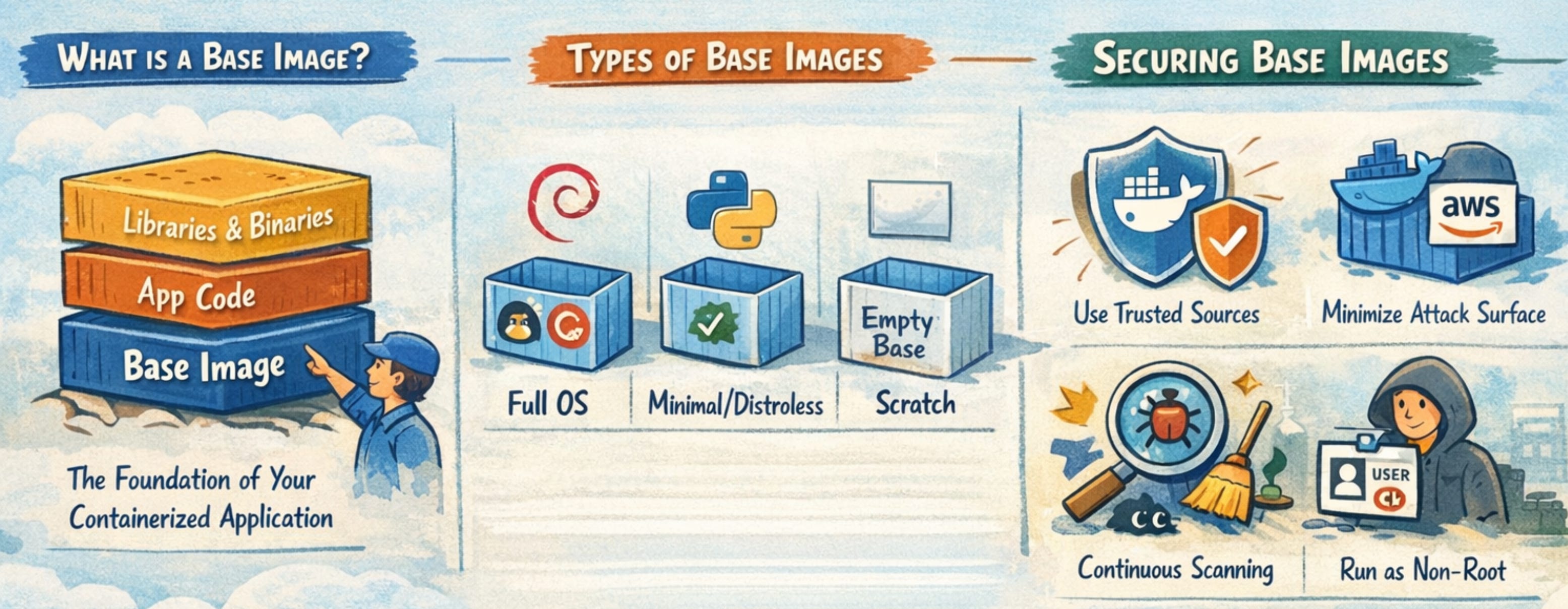
When you write a Dockerfile, the first instruction you define is the base image:
FROM ubuntu:22.04
This line determines everything your application will inherit, including:
System libraries
Package manager
Default binaries and tools
File system structure
From that point forward, every layer you add builds on top of this foundation. In simple terms, your application does not run in isolation. It runs on top of whatever the base image provides.
Because of this, the base image is not just a convenience. It is a critical part of your application’s runtime behavior and security posture.
Why Base Image Security Matters
In many real-world environments, the majority of vulnerabilities found in container images do not come from application code. They come from the base image.
Base images often include:
Pre-installed packages that may be outdated
Known vulnerabilities (CVEs) in system libraries
Unnecessary tools that expand the attack surface
Misconfigurations inherited from upstream
If a base image contains a vulnerability, every container built on top of it inherits that vulnerability. This creates a multiplication effect. A single weak base image can affect dozens or even hundreds of services in a microservices architecture.
In modern systems where containers are built and deployed continuously, this risk spreads quickly. A vulnerable base image can silently propagate across environments, making it difficult to detect and even harder to fix at scale.
Securing base images, therefore, is not optional. It is one of the most impactful ways to reduce risk across your entire system.
Types of Base Images
Different types of base images offer different trade-offs between usability, size, and security. Understanding these types helps you make better decisions.
Full OS Images
Full operating system images, such as Ubuntu or Debian, include a complete Linux distribution.
They typically provide:
Package managers like apt or yum
Shell access
A wide range of pre-installed utilities
These images are easy to work with and familiar to developers. However, they tend to be large and include many components that are not required at runtime.
As a result, they have a larger attack surface and more potential vulnerabilities.
Minimal Images
Minimal images, such as Alpine or slim variants of common distributions, reduce the number of included packages.
They are designed to:
Be lightweight
Contain only essential components
Reduce the number of potential vulnerabilities
These images are generally a better choice for production environments. However, they can introduce compatibility challenges, especially when libraries behave differently from standard distributions.
Distroless Images
Distroless images, maintained by Google, include only the application runtime and its required dependencies.
They intentionally exclude:
Shells
Package managers
Debugging tools
This significantly reduces the attack surface. Since there are fewer components, there are fewer opportunities for vulnerabilities.
The trade-off is operational complexity. Debugging issues becomes harder because common tools are not available inside the container.
Scratch Images
The scratch image is completely empty. It contains no operating system or utilities.
It is typically used for:
Statically compiled binaries (e.g., Go or Rust applications)
This approach provides the smallest possible image and the lowest attack surface.
However, it also comes with limitations:
No debugging tools
Limited compatibility
Some security scanners cannot analyze it effectively
How to Secure Base Images
Securing base images requires a combination of good selection, careful configuration, and continuous maintenance.
